

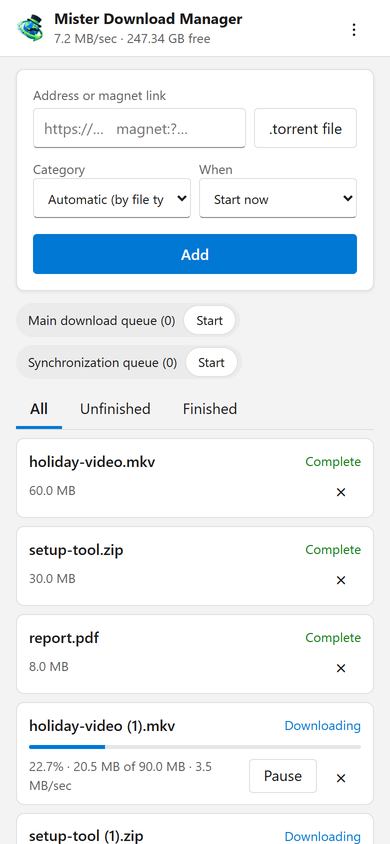
주머니 속의 다운로드
이 페이지는 휴대폰에서 다운로드 주소, 마그넷 링크 또는 .torrent 파일을 범주와 시기(지금 시작하거나 대기열에서 기다리기)와 함께 추가합니다. 각 다운로드의 진행률, 속도, 크기를 표시하고, 일시 중지 및 시작하며, 요청 시 파일과 함께 제거합니다. 대기열도 시작하고 중지합니다. 상단의 바는 총 속도와 다운로드 파일이 저장될 여유 공간을 보여줍니다.
Downloads added from the phone behave like any other: they go to the category's folder and follow the queues, the Scheduler and the speed limits. The page speaks your phone's language when GDM has it, and follows its light or dark mode.
코드로 한 번 페어링
옵션 → 원격에서 켠 다음 장치 페어링...을 클릭하세요. 휴대폰 카메라로 QR 코드를 스캔하거나 주소와 8자리 코드를 입력하세요. 코드는 10분 동안 한 번만 작동합니다.
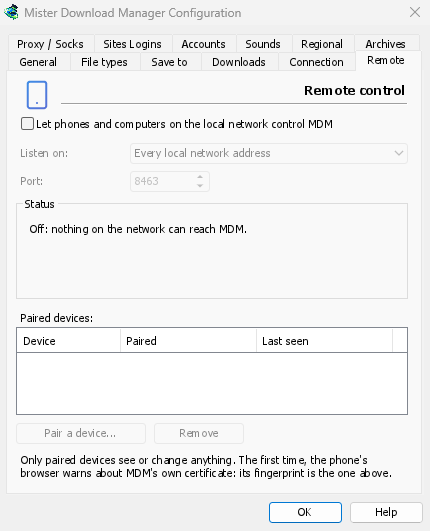
The first time, the phone's browser warns about the certificate. That is expected: GDM made it on your computer, and no public authority knows it. Options → Remote shows its fingerprint to compare. Add the page to the phone's home screen to keep it one tap away.
내 장치만, 집에서만
원격 제어는 켤 때까지 꺼져 있습니다. 페어링한 장치에만 응답하며, 각 장치는 옵션에서 즉시 제거할 수 있고, 컴퓨터의 사설 네트워크 주소에서만 수신하며 인터넷에서 접근할 수 있는 주소에서는 수신하지 않습니다. 모든 통신은 HTTPS를 통해 이루어지며, 웹 페이지는 이를 사용할 수 없습니다.
페어링된 휴대폰은 다운로드 및 대기열만 처리하며, 그 이상은 할 수 없습니다. 설정을 변경하거나, 컴퓨터에서 창을 열거나, 폴더를 볼 수 없습니다.
집 밖에서
Don't open it to the internet through your router. To reach it while you're away, use a VPN to your home network, such as WireGuard or Tailscale; with Tailscale, choose its address under Listen on. The first time, Windows may ask whether GDM may use the network: allow it on private networks, or the phone can't reach GDM.
To run GDM on a home server instead, see Server mode.
무료, 오픈 소스, 광고 없음, 평가판 없음.
Download GolinksPRO Download Manager