

- Startseite
- Funktionen
- Beschleunigung und Fortsetzen
Alle Verbindungen gleichzeitig. Dort fortgesetzt, wo es aufgehört hat.
GDM splits a file into parts and downloads them side by side, then keeps every connection busy until the last byte. If the line drops or the computer restarts, the download carries on from where it was.
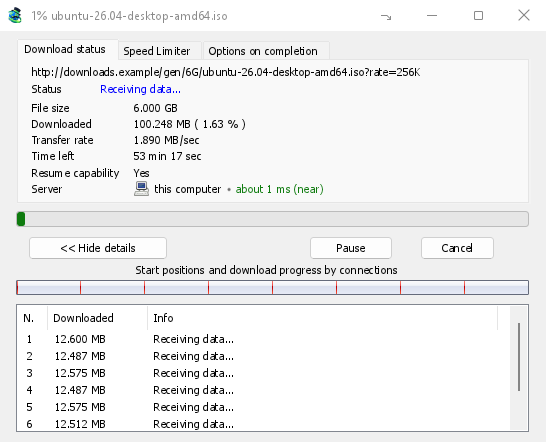
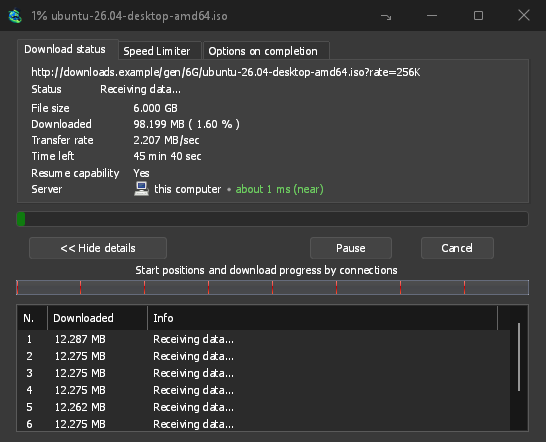
Keine Verbindung bleibt untätig
GDM opens 8 connections by default, and you can set anything from 1 to 32 in Options → Connection. When a connection finishes its part, it takes over half of the largest part still left, so the work is shared out again and again until the file is done. A connection that falls far behind the others is dropped and opened again.
Das Fortschrittsfenster zeigt den Vorgang live an: einen Balken der gesamten Datei mit Start und Fortschritt jeder Verbindung sowie eine Tabelle mit den aktuellen Aktivitäten jeder Verbindung.
Gemessen, nicht behauptet
On the same PC and the same test server, GDM fetched a 1 GiB file in 1.0 s against IDM 6.42's 5.5 s, and a 256 KiB file in 0.03 s against 3.1 s: the medians of alternating runs. The benchmark page has every run, the method and the raw data.
More connections help only where a server sends each one at a limited speed. Most servers allow a few connections per address, and GDM notices when one says no: it stops asking that server for more and lists what it learned under Exceptions in Options → Connection. You can set a number for a server yourself there too.
Mehr als 32, wenn Sie möchten
Mehr als 32 Verbindungen zulassen in Optionen → Verbindung erhöht das Limit auf 128 pro Download, auch für Serverausnahmen. Die Befehlszeilenoption -c akzeptiert Werte von 1 bis 128.
Absturzsicheres Fortsetzen
GDM saves how far each part has got as it goes. A download picks up where it stopped after you pause it, after the connection drops, or after Windows or GDM itself crashes. A connection that fails is retried on its own, and the table shows Retrying with the reason.
Before it continues, GDM checks that the file on the server is still the same one, so a changed file never gets stitched onto an old half. When a server can't send a file in parts, the progress window says Resume capability: No before you rely on it.
Direkt auf die Festplatte
Each connection writes directly into the file's place on disk, in a part file next to the final one. There is no temporary folder and no joining step at the end: when the last part arrives, GDM checks the size and renames the file.
Einen unterbrochenen Download fortsetzen zeigt, was zu tun ist, wenn ein Link abgelaufen ist.
Kostenlos, Open Source, keine Werbung, keine Testversion.
Download GolinksPRO Download Manager