

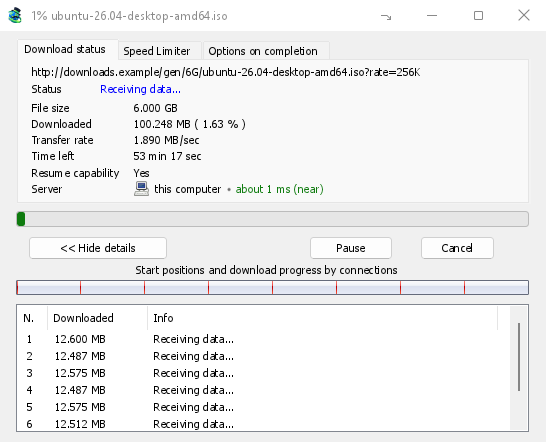
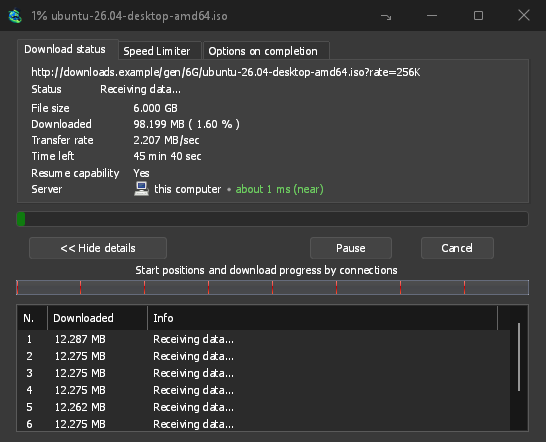
Không kết nối nào bị bỏ không
GDM opens 8 connections by default, and you can set anything from 1 to 32 in Options → Connection. When a connection finishes its part, it takes over half of the largest part still left, so the work is shared out again and again until the file is done. A connection that falls far behind the others is dropped and opened again.
Cửa sổ tiến trình vẽ lại quá trình đang diễn ra: một thanh của toàn bộ tệp với điểm bắt đầu và tiến độ của từng kết nối, và một bảng với những gì mỗi kết nối đang thực hiện ngay bây giờ.
Được đo lường, không phải tuyên bố
On the same PC and the same test server, GDM fetched a 1 GiB file in 1.0 s against IDM 6.42's 5.5 s, and a 256 KiB file in 0.03 s against 3.1 s: the medians of alternating runs. The benchmark page has every run, the method and the raw data.
More connections help only where a server sends each one at a limited speed. Most servers allow a few connections per address, and GDM notices when one says no: it stops asking that server for more and lists what it learned under Exceptions in Options → Connection. You can set a number for a server yourself there too.
Hơn 32, nếu bạn muốn
Cho phép hơn 32 kết nối trong Tùy chọn → Kết nối nâng giới hạn lên 128 cho mỗi lượt tải xuống, kể cả đối với các ngoại lệ của máy chủ. -c của dòng lệnh chấp nhận từ 1 đến 128.
Tiếp tục sau sự cố
GDM saves how far each part has got as it goes. A download picks up where it stopped after you pause it, after the connection drops, or after Windows or GDM itself crashes. A connection that fails is retried on its own, and the table shows Retrying with the reason.
Before it continues, GDM checks that the file on the server is still the same one, so a changed file never gets stitched onto an old half. When a server can't send a file in parts, the progress window says Resume capability: No before you rely on it.
Trực tiếp vào đĩa
Each connection writes directly into the file's place on disk, in a part file next to the final one. There is no temporary folder and no joining step at the end: when the last part arrives, GDM checks the size and renames the file.
Tiếp tục tải xuống bị hỏng cho biết phải làm gì khi một liên kết đã hết hạn.
Miễn phí, mã nguồn mở, không quảng cáo, không dùng thử.
Download GolinksPRO Download Manager