

If GolinksPRO Download Manager closes unexpectedly or stops responding, a crash report window opens. It shows what happened, lets you read the whole report, and can send it to the developers on GitHub. Each report helps fix the problem for everyone.
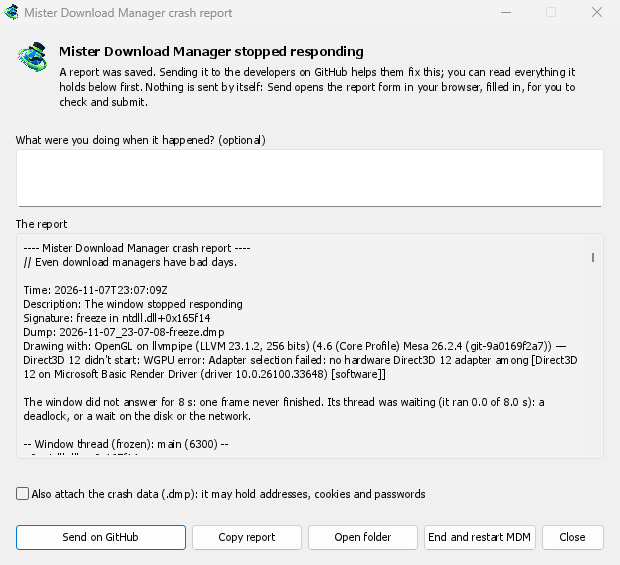
Những gì bạn sẽ thấy
- GolinksPRO Download Manager closed unexpectedly: GDM crashed, or hit an internal error and closed.
- GolinksPRO Download Manager stopped responding: its window didn't answer for 8 seconds. GDM is still running, frozen. End and restart GDM closes the frozen copy and starts a new one. If GDM answers again by itself, the window says so.
Trong cửa sổ:
- Bạn đang làm gì khi sự cố xảy ra? là mục không bắt buộc. Một vài từ, chẳng hạn như “Tôi đã mở Thêm URL”, sẽ giúp ích rất nhiều.
- Báo cáo hiển thị mọi nội dung sẽ được gửi. Bạn có thể đọc báo cáo trước khi gửi.
- Gửi trên GitHub mở biểu mẫu Báo cáo sự cố của GitHub trong trình duyệt của bạn, đã được điền sẵn, cùng với thư mục chứa báo cáo. Kéo tệp báo cáo vào biểu mẫu, kiểm tra và gửi. Bạn cần có tài khoản GitHub. Không có gì được gửi tự động.
- Nếu ai đó đã báo cáo vấn đề tương tự, cửa sổ sẽ thông báo điều đó (Đã báo cáo là vấn đề #…). Mở vấn đề đã báo cáo sẽ mở vấn đề đó và sao chép báo cáo vào khay nhớ tạm để bạn có thể thêm báo cáo dưới dạng bình luận.
The other buttons copy the report, open its folder, or start GDM again.
Nội dung báo cáo
- What happened: the error and the place in GDM's code where it happened.
- The stack: the place in GDM's code where it crashed or froze, and what every other part of it was doing.
- GDM's recent log: for example "command AddUrl" or "window opened: add-url".
- The system: GDM's version and how you installed it, your operating system and its version, the processor, the language and theme, and how many downloads and queues you have. These are counts only.
Báo cáo không chứa:
- địa chỉ tải xuống hoặc tên tệp của bạn;
- tên người dùng của bạn, được thay bằng
~trong đường dẫn thư mục.
Nếu thông báo lỗi trích dẫn nội dung bạn đã nhập, nội dung đó sẽ có trong báo cáo. Vì vậy, hãy đọc báo cáo trước khi gửi.
The crash data file (.dmp) is a snapshot of what GDM was running at that moment. It helps the developers most, but it can hold pieces of what GDM had in memory, such as download addresses, cookies and saved passwords. It is only attached when you tick Also attach the crash data.
Nơi lưu báo cáo
In GDM's data folder:
crashes\: mỗi báo cáo (.txt) và dữ liệu sự cố tương ứng (.dmp);logs\: GDM's log (mdm.log, with older ones asmdm.1.logand so on, 2 MB each).
GDM's data folder is %APPDATA%\misterdownloadmanager on Windows, ~/Library/Application Support/misterdownloadmanager on macOS, and ~/.local/share/misterdownloadmanager on Linux. In portable mode it is the data folder next to the program.
The log records what GDM does, so a report can show what led to a problem. To log more detail, start GDM with the environment variable MDM_LOG=debug.
Dành cho nhà phát triển
How it works: a second copy of GDM, the monitor, starts beside it with --crash-monitor. The crash code lives in crates/crash and crates/app/src/crash.rs.
- Catching problems. When GDM crashes (a Windows exception, a signal on Linux, a Mach exception on macOS), panics, or freezes, it asks the monitor for a dump. A freeze is a frame of the window running more than 8 s, seen by a watchdog thread that ignores time spent asleep. It times both parts of a frame: what GDM handles (the commands that come in, the clock of downloads, queues and the Scheduler), which runs minimized too, and the drawing; never the wait between frames. The watchdog also measures how much processor time the window thread got meanwhile, and the report says what that means: it ran all along (a loop), it waited in a lock or on I/O (a deadlock), or it hardly ran in ordinary code, which is a computer too busy to run GDM or slow to load it from disk, most likely not GDM's bug (those share one signature,
freeze while the computer was busy). When the window thread is already back in the event loop by the time the dump is written, the freeze was over before the snapshot, so its stack can't explain it; those reports say so and share the signaturefreeze over before the snapshot. macOS doesn't measure it yet. The monitor then writes a minidump of every thread from outside, throughminidumperandcrash-handler. A crashed process never writes its own dump, which is how Firefox, Crashpad and Sentry do it too. - Đọc tệp kết xuất. Trình giám sát đọc tệp kết xuất bằng
rust-minidumpcủa Mozilla. Trình này sử dụng các ký hiệu Breakpad của bản phát hành nếu tìm thấy. Bản dựng từ mã nguồn cũng có thể đọc thông tin gỡ lỗi gốc nằm bên cạnh (.pdb, DWARF) nếu được dựng với--features mdm-crash/native-symbols; ứng dụng được phát hành không có trình đọc này để tiết kiệm vài MB. Chữ ký của báo cáo (ví dụfreeze in misterdownloadmanager::winui::combo_edit) không đổi giữa các báo cáo về cùng một vấn đề, và cửa sổ sẽ tìm kiếm các vấn đề hiện có theo chữ ký đó. - Ký hiệu. Các bản dựng phát hành giữ lại bảng dòng (
debug = "line-tables-only"), nhưng không có bản tải xuống nào kèm thông tin gỡ lỗi. CI chuyển thông tin này thànhMisterDownloadManager-<version>-symbols-<platform>.zip(tools/installer/symbols.py, sử dụngdump_symscủa Mozilla) và đăng cùng các tệp khác của bản phát hành. Cửa sổ báo cáo sẽ tải tệp zip dành cho phiên bản đang dùng khi ngăn xếp chỉ hiển thị các địa chỉ. - Một
.dmptừ một vấn đề:
cargo run -p mdm-crash --bin mdm-symbolicate -- crash.dmp MisterDownloadManager-<version>-symbols-windows-x64.zip
- Testing it.
cargo test -p mdm-crashruns a real freeze, panic and crash (examples/crashy.rs) and checks each report's signature. To try it in the app, start GDM withMDM_CRASH_TEST=1, then runmisterdownloadmanager /show crash-test:freeze(a deadlock; orspin, 12 s of a busy window thread,panic,crash,abort).cargo test -p mdm-app --test freeze_report -- --ignoreddoes that in a copy of the app off the screens, its window visible and minimized.
Miễn phí, mã nguồn mở, không quảng cáo, không dùng thử.
Download GolinksPRO Download Manager