

If GolinksPRO Download Manager closes unexpectedly or stops responding, a crash report window opens. It shows what happened, lets you read the whole report, and can send it to the developers on GitHub. Each report helps fix the problem for everyone.
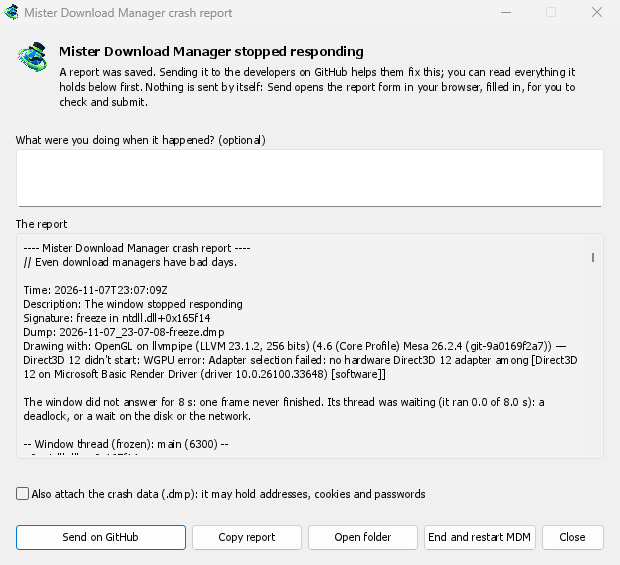
Ne görürsünüz
- GolinksPRO Download Manager closed unexpectedly: GDM crashed, or hit an internal error and closed.
- GolinksPRO Download Manager stopped responding: its window didn't answer for 8 seconds. GDM is still running, frozen. End and restart GDM closes the frozen copy and starts a new one. If GDM answers again by itself, the window says so.
Pencerede:
- Olay olduğunda ne yapıyordunuz? isteğe bağlıdır. "URL Ekle'yi açtım" gibi birkaç kelime çok yardımcı olur.
- Rapor gönderilecek her şeyi gösterir. İsterseniz önce okuyun.
- GitHub'a gönder, tarayıcınızda GitHub'ın Kilitlenme raporu formunu, raporu içeren klasörle birlikte önceden doldurulmuş olarak açar. Rapor dosyasını forma sürükleyin, kontrol edin ve gönderin. Bir GitHub hesabınızın olması gerekir. Hiçbir şey kendi kendine gönderilmez.
- Birisi aynı sorunu zaten bildirdiyse, pencere bunu belirtir (Zaten #… sorunu olarak bildirildi). Bildirilen sorunu aç onu açar ve raporunuzu panoya kopyalar, böylece yorum olarak ekleyebilirsiniz.
The other buttons copy the report, open its folder, or start GDM again.
Raporda neler bulunur
- What happened: the error and the place in GDM's code where it happened.
- The stack: the place in GDM's code where it crashed or froze, and what every other part of it was doing.
- GDM's recent log: for example "command AddUrl" or "window opened: add-url".
- The system: GDM's version and how you installed it, your operating system and its version, the processor, the language and theme, and how many downloads and queues you have. These are counts only.
Şunları içermez:
- indirme adresleriniz veya dosya adlarınız;
- klasör yollarında
~olarak görünen kullanıcı adınız.
Bir hata mesajı yazdığınız bir şeyi alıntılıyorsa, o metin raporda yer alır, bu yüzden göndermeden önce okuyun.
The crash data file (.dmp) is a snapshot of what GDM was running at that moment. It helps the developers most, but it can hold pieces of what GDM had in memory, such as download addresses, cookies and saved passwords. It is only attached when you tick Also attach the crash data.
Raporlar nerede saklanır
In GDM's data folder:
crashes\: her rapor (.txt) ve kilitlenme verileri (.dmp);logs\: GDM's log (mdm.log, with older ones asmdm.1.logand so on, 2 MB each).
GDM's data folder is %APPDATA%\misterdownloadmanager on Windows, ~/Library/Application Support/misterdownloadmanager on macOS, and ~/.local/share/misterdownloadmanager on Linux. In portable mode it is the data folder next to the program.
The log records what GDM does, so a report can show what led to a problem. To log more detail, start GDM with the environment variable MDM_LOG=debug.
Geliştiriciler için
How it works: a second copy of GDM, the monitor, starts beside it with --crash-monitor. The crash code lives in crates/crash and crates/app/src/crash.rs.
- Catching problems. When GDM crashes (a Windows exception, a signal on Linux, a Mach exception on macOS), panics, or freezes, it asks the monitor for a dump. A freeze is a frame of the window running more than 8 s, seen by a watchdog thread that ignores time spent asleep. It times both parts of a frame: what GDM handles (the commands that come in, the clock of downloads, queues and the Scheduler), which runs minimized too, and the drawing; never the wait between frames. The watchdog also measures how much processor time the window thread got meanwhile, and the report says what that means: it ran all along (a loop), it waited in a lock or on I/O (a deadlock), or it hardly ran in ordinary code, which is a computer too busy to run GDM or slow to load it from disk, most likely not GDM's bug (those share one signature,
freeze while the computer was busy). When the window thread is already back in the event loop by the time the dump is written, the freeze was over before the snapshot, so its stack can't explain it; those reports say so and share the signaturefreeze over before the snapshot. macOS doesn't measure it yet. The monitor then writes a minidump of every thread from outside, throughminidumperandcrash-handler. A crashed process never writes its own dump, which is how Firefox, Crashpad and Sentry do it too. - Döküm okunuyor. İzleyici, dökümü Mozilla'nın
rust-minidumpile okur. Bulunduğunda sürümün Breakpad sembollerini kullanır. Kaynaktan derlenen bir yapı,--features mdm-crash/native-symbolsile derlendiğinde yanındaki yerel hata ayıklama bilgilerini (kendi.pdb, DWARF) de okuyabilir; dağıtılan uygulama ise birkaç MB'lık bu okuyucu olmadan gelir. Raporun İmzası (örneğinfreeze in misterdownloadmanager::winui::combo_edit) aynı soruna ait raporlarda değişmez ve pencere, bu imzaya göre mevcut sorunları arar. - Semboller. Sürüm yapıları satır tablolarını (
debug = "line-tables-only") içerir, ancak hiçbir indirme hata ayıklama bilgilerini içermez. CI bunlarıMisterDownloadManager-<version>-symbols-<platform>.zip'e (tools/installer/symbols.py, Mozilla'nındump_symskullanarak) dönüştürür ve sürümün diğer dosyalarıyla birlikte yayımlar. Yığın yalın adresler gösterdiğinde rapor penceresi kendi sürümüne ait zip dosyasını indirir. - Bir soruna ait
.dmp:
cargo run -p mdm-crash --bin mdm-symbolicate -- crash.dmp MisterDownloadManager-<version>-symbols-windows-x64.zip
- Testing it.
cargo test -p mdm-crashruns a real freeze, panic and crash (examples/crashy.rs) and checks each report's signature. To try it in the app, start GDM withMDM_CRASH_TEST=1, then runmisterdownloadmanager /show crash-test:freeze(a deadlock; orspin, 12 s of a busy window thread,panic,crash,abort).cargo test -p mdm-app --test freeze_report -- --ignoreddoes that in a copy of the app off the screens, its window visible and minimized.
Ücretsiz, açık kaynak, reklamsız, deneme sürümü yok.
Download GolinksPRO Download Manager