

If GolinksPRO Download Manager closes unexpectedly or stops responding, a crash report window opens. It shows what happened, lets you read the whole report, and can send it to the developers on GitHub. Each report helps fix the problem for everyone.
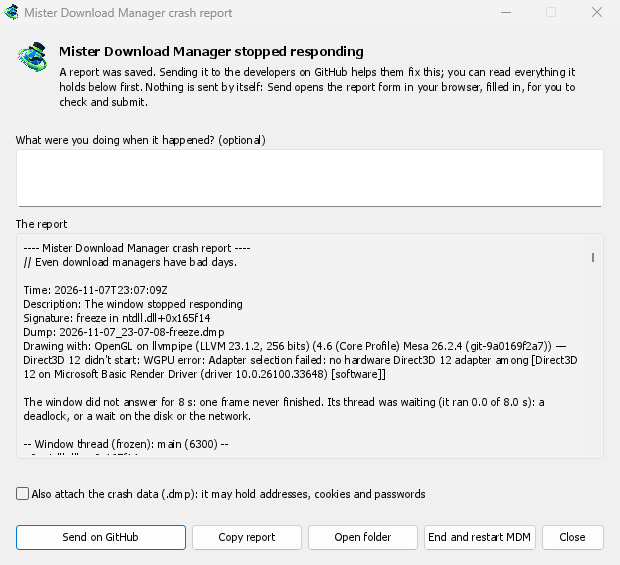
Что вы видите
- GolinksPRO Download Manager closed unexpectedly: GDM crashed, or hit an internal error and closed.
- GolinksPRO Download Manager stopped responding: its window didn't answer for 8 seconds. GDM is still running, frozen. End and restart GDM closes the frozen copy and starts a new one. If GDM answers again by itself, the window says so.
В окне:
- Что вы делали, когда это произошло? — необязательное поле. Несколько слов, например «Я открыл Добавить URL», очень помогают.
- Отчет показывает все, что будет отправлено. Прочитайте его сначала, если хотите.
- Отправить на GitHub открывает в вашем браузере форму Отчет о сбое на GitHub, уже заполненную, а также папку, содержащую отчет. Перетащите файл отчета в форму, проверьте его и отправьте. Вам потребуется учетная запись GitHub. Ничего не отправляется автоматически.
- Если кто-то уже сообщил о той же проблеме, окно сообщает об этом (Уже сообщено как проблема #…). Открыть сообщенную проблему открывает ее и помещает ваш отчет в буфер обмена, чтобы вы могли добавить его в качестве комментария.
The other buttons copy the report, open its folder, or start GDM again.
Что содержит отчет
- What happened: the error and the place in GDM's code where it happened.
- The stack: the place in GDM's code where it crashed or froze, and what every other part of it was doing.
- GDM's recent log: for example "command AddUrl" or "window opened: add-url".
- The system: GDM's version and how you installed it, your operating system and its version, the processor, the language and theme, and how many downloads and queues you have. These are counts only.
Он не содержит:
- ваши адреса загрузки или имена файлов;
- ваше имя пользователя, которое отображается как
~в путях к папкам.
Если в сообщении об ошибке цитируется что-то, что вы ввели, этот текст содержится в отчете, поэтому прочитайте его перед отправкой.
The crash data file (.dmp) is a snapshot of what GDM was running at that moment. It helps the developers most, but it can hold pieces of what GDM had in memory, such as download addresses, cookies and saved passwords. It is only attached when you tick Also attach the crash data.
Где хранятся отчеты
In GDM's data folder:
crashes\: каждый отчет (.txt) и его данные о сбое (.dmp);logs\: GDM's log (mdm.log, with older ones asmdm.1.logand so on, 2 MB each).
GDM's data folder is %APPDATA%\misterdownloadmanager on Windows, ~/Library/Application Support/misterdownloadmanager on macOS, and ~/.local/share/misterdownloadmanager on Linux. In portable mode it is the data folder next to the program.
The log records what GDM does, so a report can show what led to a problem. To log more detail, start GDM with the environment variable MDM_LOG=debug.
Для разработчиков
How it works: a second copy of GDM, the monitor, starts beside it with --crash-monitor. The crash code lives in crates/crash and crates/app/src/crash.rs.
- Catching problems. When GDM crashes (a Windows exception, a signal on Linux, a Mach exception on macOS), panics, or freezes, it asks the monitor for a dump. A freeze is a frame of the window running more than 8 s, seen by a watchdog thread that ignores time spent asleep. It times both parts of a frame: what GDM handles (the commands that come in, the clock of downloads, queues and the Scheduler), which runs minimized too, and the drawing; never the wait between frames. The watchdog also measures how much processor time the window thread got meanwhile, and the report says what that means: it ran all along (a loop), it waited in a lock or on I/O (a deadlock), or it hardly ran in ordinary code, which is a computer too busy to run GDM or slow to load it from disk, most likely not GDM's bug (those share one signature,
freeze while the computer was busy). When the window thread is already back in the event loop by the time the dump is written, the freeze was over before the snapshot, so its stack can't explain it; those reports say so and share the signaturefreeze over before the snapshot. macOS doesn't measure it yet. The monitor then writes a minidump of every thread from outside, throughminidumperandcrash-handler. A crashed process never writes its own dump, which is how Firefox, Crashpad and Sentry do it too. - Чтение дампа. Монитор читает дамп с помощью
rust-minidumpот Mozilla. Он использует символы Breakpad из релиза, если они найдены. Сборка из исходного кода также может читать нативную отладочную информацию (ее.pdb, DWARF), если она собрана с--features mdm-crash/native-symbols; поставляемое приложение не содержит этого читателя, что экономит несколько МБ. Подпись отчета (например,freeze in misterdownloadmanager::winui::combo_edit) остается одинаковой для всех отчетов об одной и той же проблеме, и окно ищет по ней существующие проблемы. - Символы. Релизные сборки сохраняют таблицы строк (
debug = "line-tables-only"), но ни одна загрузка не включает отладочную информацию. CI преобразует ее вMisterDownloadManager-<version>-symbols-<platform>.zip(tools/installer/symbols.py, используяdump_symsот Mozilla), публикуемые вместе с другими файлами релиза. Окно отчета получает zip-архив для своей версии, когда стек показывает «голые» адреса. .dmpиз проблемы:
cargo run -p mdm-crash --bin mdm-symbolicate -- crash.dmp MisterDownloadManager-<version>-symbols-windows-x64.zip
- Testing it.
cargo test -p mdm-crashruns a real freeze, panic and crash (examples/crashy.rs) and checks each report's signature. To try it in the app, start GDM withMDM_CRASH_TEST=1, then runmisterdownloadmanager /show crash-test:freeze(a deadlock; orspin, 12 s of a busy window thread,panic,crash,abort).cargo test -p mdm-app --test freeze_report -- --ignoreddoes that in a copy of the app off the screens, its window visible and minimized.
Бесплатно, с открытым исходным кодом, без рекламы, без пробного периода.
Download GolinksPRO Download Manager