

A download that stopped halfway doesn't have to start over. GDM keeps what it has and continues from there.
Após uma ligação interrompida
When the connection drops, GDM retries on its own. In the progress window, the connection table shows Retrying and the reason. Usually the download goes on by itself once the connection is back.
Se desistir e mostrar Erro:
- Selecione a transferência na lista.
- Clique em Retomar na barra de ferramentas (ou clique com o botão direito → Retomar Transferência).
Após uma falha ou um reinício
GDM saves each download's progress as it goes, so a Windows crash, a power cut or closing GDM loses at most the last moments.
- Start GDM. The download is in the list under Unfinished.
- Selecione-a e clique em Retomar.
Quando a ligação expirou
Muitos sites fornecem ligações que só funcionam por um tempo, ou apenas enquanto estiver com sessão iniciada. Retomar falha então, porque o endereço antigo já não responde.
- Clique com o botão direito na transferência e escolha Atualizar endereço de transferência.
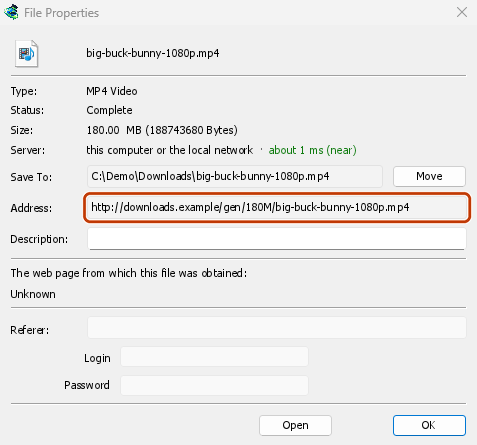
- GDM opens the web page the link came from (when it knows it), and the download's File Properties.
- On the web page, start the download again, or copy the new download link (right-click → Copy link). If the browser hands the new download to GDM, cancel it there: you only need the address.
- Cole a nova ligação em Endereço nas Propriedades do Ficheiro e clique em OK.
- Clique em Retomar. A transferência continua de onde parou, usando o novo endereço.
The new address has to point at the same file. If it doesn't, GDM stops with the file changed on the server.
Quando o ficheiro mudou no servidor
If the site replaced the file with a new version, the parts GDM has don't fit any more. Right-click the download and choose Redownload to start again from the beginning. A finished file is only replaced when the new download completes.
Quando não é possível retomar
Look at Resume capability in the progress window. No means the server can't send a file in parts. GDM then uses one connection, and a download that stops has to start over. For such servers, avoid stopping the download, and avoid a very low speed limit, which can make the server drop the connection.
Próximos passos
Gratuito, de código aberto, sem anúncios, sem período de avaliação.
Download GolinksPRO Download Manager