

GolinksPRO Download Manager (GDM) is a free download manager for Windows and Linux (and, still experimental, macOS). It is laid out the way Internet Download Manager users expect: a toolbar, categories on the left, one list of downloads and a browser extension that hands downloads to it.
Deze pagina's leggen elk onderdeel van het programma uit. De tutorials leiden u stap voor stap door de meest voorkomende taken.
Begin hier
- Getting started — install GDM (setup, portable or zip on Windows; the packages on Linux; the .dmg on a Mac), choose a language and find your way around the main window.
- Uw eerste download — in twee minuten van gekopieerde link naar geopend bestand.
Downloaden
- Downloads toevoegen — URL toevoegen, het klembord, het drop-doel, batchdownloads en lijsten met links, en Download starten versus Later downloaden.
- Linkgrabber en archieven — veel links tegelijk, in pakketten; zip-, 7z- en rar-archieven worden uitgepakt na het downloaden.
- Browser integration — the extension for Firefox (from addons.mozilla.org), Chrome, Edge, Brave, Opera and Vivaldi (from the Chrome Web Store), which downloads it takes, and what happens when GDM isn't running.
- Run GDM on a server — GDM without a window on a home server or NAS (Docker, Unraid), downloading into its folders; send it downloads from your phone or browser.
- Control GDM from your phone — add links, magnets and torrents from a phone or another computer at home, and watch and control the list.
Organiseren
- De downloadlijst — kolommen, filters, de categorieënboom, meerdere downloads selecteren, een download zoeken en downloads verwijderen met of zonder de bestanden.
- Wachtrijen en de Planner — downloads per paar uitvoeren, ze op gezette tijden starten en stoppen, en de computer uitschakelen als ze klaar zijn.
Snelheid en verbindingen
- Connections and speed — the progress window, how GDM splits a file over several connections, resuming, and the Speed Limiter.
Video en torrents
- Video downloads — een video downloaden vanaf de pagina (YouTube, Vimeo en vele andere) met yt-dlp.
- Afbeeldingengalerijen — download de afbeeldingen van een galerij (Wikimedia Commons, Flickr, DeviantArt en vele andere) met gallery-dl.
- Torrents — magnetlinks en .torrent-bestanden, bestanden kiezen en delen.
- Torrents en uw veiligheid — wat anderen kunnen zien, de netwerkswitches, blokkeerlijsten, proxy's.
- Debrid-serviceaccounts — Real-Debrid, AllDebrid en Premiumize: bestandshostlinks via uw eigen account.
Instellingen
- Opties — elke pagina van het Opties-venster.
- Thema's — de ingebouwde looks (Klassiek, Systeemeigen, Hoog contrast, Metro, Adwaita, Breeze, Luna, Aero, Aqua), en hoe u uw eigen thema maakt in een tekstbestand.
- Talen — de 86 interfacestalen, getallen en datums, rechts-naar-links-indelingen en hoe u kunt helpen met vertalen.
- Portable mode — run GDM from a folder or a USB stick without installing it.
- Toetsenbordsneltoetsen — elke toets waarop het hoofdvenster reageert, en schermlezers.
- Opdrachtregel en automatisering — de opdrachtregelopties van IDM, de
misterdownloadmanager-cli-tool en de automatiserings-API die andere programma's kunnen gebruiken. - AI-assistenten (MCP) — laat Claude, Cursor, VS Code of een andere MCP-assistent uw downloads weergeven, toevoegen, pauzeren en verwijderen.
Handleidingen
- Een bestand downloaden — een link kopiëren, toevoegen, het bestand openen.
- Catch downloads from your browser — set up the extension so clicked downloads go to GDM.
- Overnacht downloaden — bestanden in de wachtrij plaatsen en de Planner ze 's nachts laten starten.
- Een afgebroken download hervatten — verdergaan na een verbroken verbinding, een crash of een verlopen link.
- Keep some speed for everything else — cap GDM so browsing and calls stay smooth.
- Een video van een pagina downloaden — een kwaliteit kiezen en een video opslaan.
- Carry GDM on a USB stick — the portable copy, with downloads saved to the stick.
- Een download vinden in een lange lijst — Zoeken, Volgende zoeken en kolomfilters.
Help
- Crash reports — what the crash report window shows when GDM closes unexpectedly or stops responding, what a report contains, and how to send it.
- Probleemoplossing — wat u moet controleren wanneer een download mislukt, de browser een download niet doorgeeft of een planning niet start.
- The browser and GDM aren't connected — what the extension's red ! means, reason by reason, and how to fix each.
- Releases — de nieuwste versie downloaden.
- Report a problem — or use Help → Report a problem in GDM, which fills in your version, system and how GDM was installed for you.
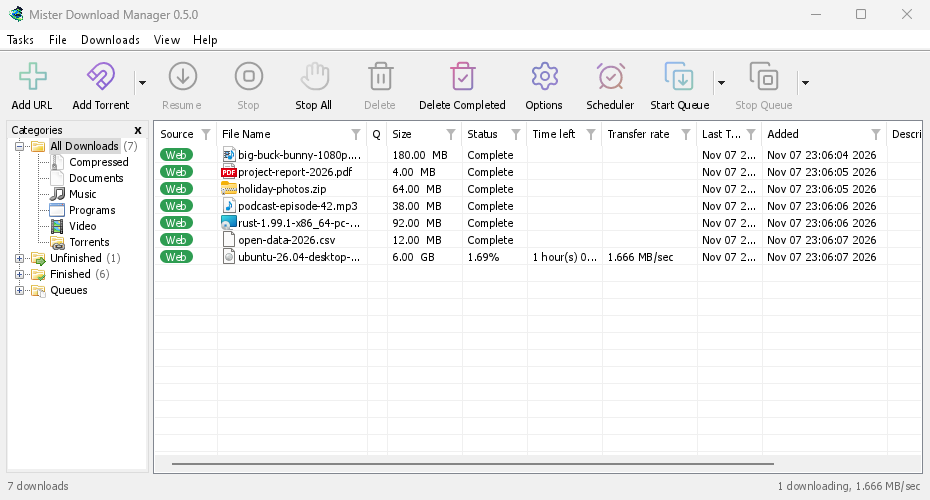
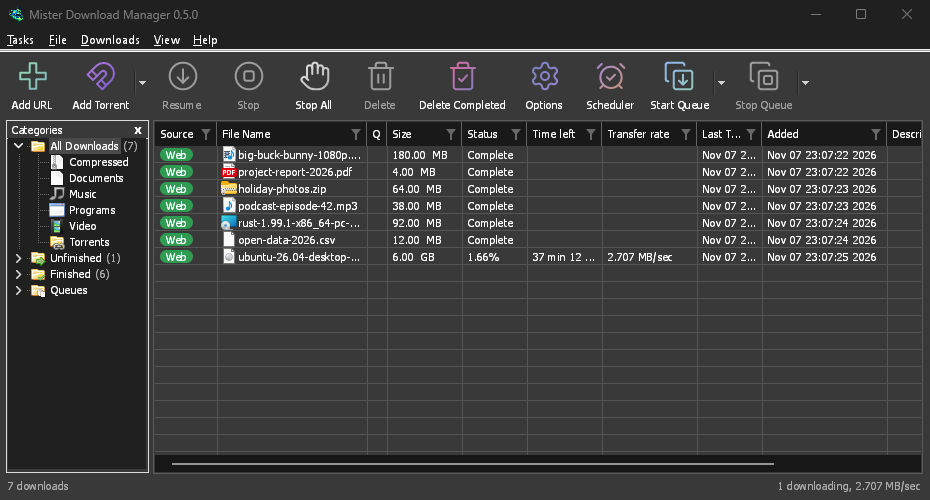
Screenshots in these docs show Windows and the light theme unless noted; on the website each has its dark version beside it. GDM follows the system's dark mode: when Windows (or your desktop) is set to dark, GDM is dark too.
Gratis, open source, geen advertenties, geen proefversie.
Download GolinksPRO Download Manager