

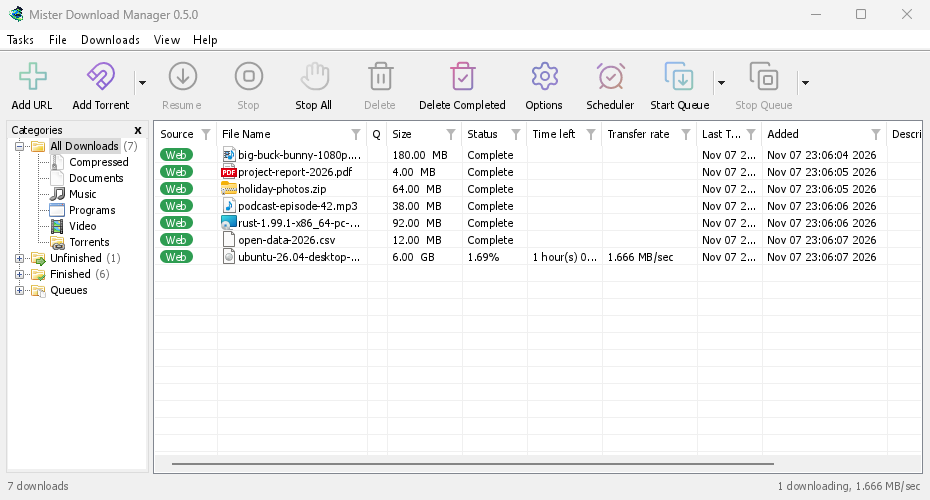
GolinksPRO Download Manager (GDM) is a free download manager for Windows and Linux (and, still experimental, macOS). It is laid out the way Internet Download Manager users expect: a toolbar, categories on the left, one list of downloads and a browser extension that hands downloads to it.
各ページでは、プログラムの各機能について説明しています。チュートリアルでは、よく行う操作を1つずつ順を追って説明します。
ここから始める
- Getting started — install GDM (setup, portable or zip on Windows; the packages on Linux; the .dmg on a Mac), choose a language and find your way around the main window.
- 最初のダウンロード — リンクをコピーしてからファイルを開くまでを、2分で順を追って説明します。
ダウンロード
- ダウンロードの追加 — [URL を追加]、クリップボード、ドロップ先、複数ファイルのダウンロードとリンク一覧、[ダウンロード開始]と[後でダウンロード]の違い。
- リンク グラバーとアーカイブ — 複数のリンクをまとめてパッケージとしてダウンロードする方法と、zip、7z、rar アーカイブをダウンロード時に展開する方法。
- Browser integration — the extension for Firefox (from addons.mozilla.org), Chrome, Edge, Brave, Opera and Vivaldi (from the Chrome Web Store), which downloads it takes, and what happens when GDM isn't running.
- Run GDM on a server — GDM without a window on a home server or NAS (Docker, Unraid), downloading into its folders; send it downloads from your phone or browser.
- Control GDM from your phone — add links, magnets and torrents from a phone or another computer at home, and watch and control the list.
整理する
- ダウンロード一覧 — 列、フィルター、カテゴリツリー、複数のダウンロードの選択、ダウンロードの検索、ファイルを残す場合と削除する場合のダウンロードの削除。
- キューとスケジューラ — ダウンロードを一度に数件ずつ実行する方法、時刻に合わせて開始・停止する方法、完了時にコンピューターをシャットダウンする方法。
速度と接続
- Connections and speed — the progress window, how GDM splits a file over several connections, resuming, and the Speed Limiter.
ビデオとトレント
- ビデオのダウンロード — yt-dlp を使って、ページからビデオ(YouTube、Vimeo など)をダウンロードする方法。
- 画像ギャラリー — gallery-dl を使って、ギャラリーの画像(Wikimedia Commons、Flickr、DeviantArt など)をダウンロードする方法。
- トレント — マグネットリンクと .torrent ファイル、ファイルの選択、共有。
- トレントとセキュリティ — 他のユーザーに見える情報、ネットワーク切り替え、ブロックリスト、プロキシ。
- デブリットサービスアカウント — Real-Debrid、AllDebrid、Premiumize: ご自身のアカウントを通じてファイルホストのリンクを利用できます。
設定
- オプション — [オプション]ウィンドウの各ページ。
- テーマ — 内蔵の見た目 (クラシック、ネイティブ、ハイ コントラスト、Metro、Adwaita、Breeze、Luna、Aero、Aqua) と、テキスト ファイルで独自のテーマを作成する方法。
- 言語 — 86 のインターフェース言語、数字と日付、右から左へのレイアウト、翻訳への協力方法。
- Portable mode — run GDM from a folder or a USB stick without installing it.
- キーボード ショートカット — メイン ウィンドウが応答するすべてのキーとスクリーン リーダー。
- コマンドラインと自動化 — IDM のコマンドラインオプション、
misterdownloadmanager-cliツール、他のプログラムから利用できる自動化 API。 - AI アシスタント (MCP) — Claude、Cursor、VS Code などの MCP アシスタントを使って、ダウンロードの一覧表示、追加、一時停止、削除を行う方法。
チュートリアル
- ファイルをダウンロード — リンクをコピーして追加し、ファイルを開く方法。
- Catch downloads from your browser — set up the extension so clicked downloads go to GDM.
- 夜間にダウンロード — ファイルをキューに追加し、スケジューラで夜間にダウンロードを開始する方法。
- 中断されたダウンロードを再開 — 接続の切断、クラッシュ、リンクの期限切れの後にダウンロードを続ける方法。
- Keep some speed for everything else — cap GDM so browsing and calls stay smooth.
- ページからビデオをダウンロード — 画質を選んでビデオを保存する方法。
- Carry GDM on a USB stick — the portable copy, with downloads saved to the stick.
- 長いリストからダウンロードを検索 — 検索、次を検索、および列フィルター。
ヘルプ
- Crash reports — what the crash report window shows when GDM closes unexpectedly or stops responding, what a report contains, and how to send it.
- トラブルシューティング — ダウンロードが失敗した場合、ブラウザがダウンロードを渡さない場合、またはスケジュールが開始しない場合に確認すること。
- The browser and GDM aren't connected — what the extension's red ! means, reason by reason, and how to fix each.
- リリース — 最新バージョンをダウンロードします。
- Report a problem — or use Help → Report a problem in GDM, which fills in your version, system and how GDM was installed for you.
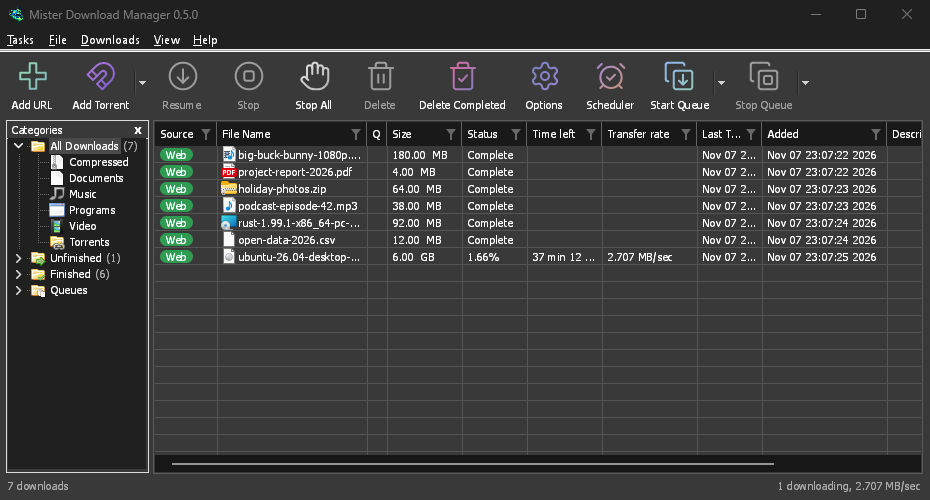
Screenshots in these docs show Windows and the light theme unless noted; on the website each has its dark version beside it. GDM follows the system's dark mode: when Windows (or your desktop) is set to dark, GDM is dark too.
無料、オープンソース、広告なし、試用期間なし。
Download GolinksPRO Download Manager