

With the GDM extension, clicking a download link in your browser hands the download to GDM. GDM gets the address together with the page it came from (the referrer), your cookies for the site and the browser's User-Agent, so downloads that need you to be signed in still work.
此扩展程序适用于 Google Chrome、Microsoft Edge、Brave、Opera 和 Vivaldi,以及 Firefox 140 或更高版本,和 Mac 上的 Safari 17 或更高版本(请参阅 Safari)。
Browsers built on them work too: Chromium and Helium take the extension as Chrome does, Brave Origin as Brave does, Zen and LibreWolf as Firefox does. On Windows, Zen has a bug of its own (see The browser and GDM aren't connected).
设置
浏览器集成包含两部分:一个与浏览器通信的小型辅助程序,以及扩展程序本身。
- Install GDM with the setup and keep Set up browser integration (Chrome, Edge, Brave, Firefox) ticked. This registers the helper. (The portable copy can't do this; see Portable mode.) On Linux and macOS GDM registers it itself, each time it starts, for the browsers installed then.
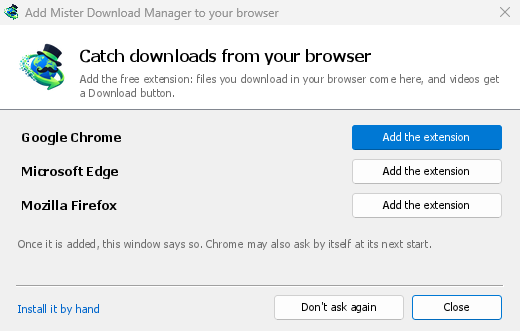
- Add the extension to each browser you use, as below: Firefox from its add-ons store, the others from the Chrome Web Store. Until a browser's extension has reached GDM, GDM's Add GolinksPRO Download Manager to your browser window opens at each start: it lists the browsers it found, and Add the extension opens the store's page in that browser. Install it by hand opens the steps for loading it without the store; Don't ask again stops the window.

Firefox
Firefox 140 or later is needed. Install the add-on from its page on addons.mozilla.org, GolinksPRO Download Manager: click Add to Firefox. Firefox keeps it updated. Zen and LibreWolf install it from the same page. (GDM's Add GolinksPRO Download Manager to your browser window opens that page for you.)
Chrome、Edge、Brave、Opera 和 Vivaldi
Install the extension from its page in the Chrome Web Store, GolinksPRO Download Manager: click Add to Chrome. In Edge the button is Get: Edge first asks to Allow extensions from other stores (click Allow), then Add extension. The browser keeps it updated. GDM's Add GolinksPRO Download Manager to your browser window opens that page in each browser for you, and Chrome may offer it by itself at its next start once GDM is installed.
To load it by hand instead (a browser that can't use the store, or a build of your own): its files are in the extension folder where GDM is installed: %LOCALAPPDATA%\Programs\GolinksPRO Download Manager\extension if you installed it for yourself, or Program Files\GolinksPRO Download Manager\extension if you installed it for everyone. Every release also has them as their own download, ...-extension-chromium.zip (unzip it first).
- 打开扩展程序页面:
chrome://extensions、edge://extensions或brave://extensions。 - 开启开发者模式。
- 点击加载已解压的扩展,然后选择
extension\chromium文件夹。
GolinksPRO Download Manager appears in the list. Leave it turned on. Pin its button to the toolbar to see at a glance whether the browser reaches GDM.
Safari (macOS)
Mac 应用程序自带 Safari 扩展程序:无需下载。需要 Safari 17 或更高版本以及 macOS 14 或更高版本。
- Drag GDM to Applications and start it once. GDM's Add GolinksPRO Download Manager to your browser window lists Safari: How to Add shows the steps below.
- In Safari open Settings → Extensions and tick GolinksPRO Download Manager. Click Always Allow on Every Website: the extension needs to read the site to pass your sign-in on.
- 由于此应用程序未经 Apple 公证(实验版本未经公证),Safari 仅在允许未签名扩展程序时才列出此扩展程序:设置 → 高级 → 显示网页开发者功能,然后设置 → 开发者 → 允许未签名扩展程序。Safari 每次退出时都会忘记此设置。
Safari 不允许扩展程序查看或停止浏览器的下载,因此其工作方式与其他浏览器不同:
- Works as in the other browsers: the right-click items, the button over videos, Media on this page, the toolbar button, Alt-click, GDM starting by itself, and every rule in Options.
- A click on a link to a file type GDM takes goes to GDM. A download the page starts by itself (a script, or a link with no file name in its address that the server answers with a file) stays with Safari: use right-click → Download with GolinksPRO Download Manager for those.
- 不可用:共享浏览器的代理或 VPN,以及表单下载。
从普通 zip 文件安装
The -x64.zip copy has no installer, but you can register the helper yourself. Open a command prompt in GDM's folder and run:
misterdownloadmanager-nmhost.exe --register
此操作仅适用于您的 Windows 账户。--unregister 可撤销此操作。然后按照上述说明,从 zip 文件的 extension 文件夹中加载扩展。
所需条件
When you click a download, the extension checks GDM's Options:
- Options → General → Use advanced browser integration must be on. Turn it off to send nothing to GDM.
- 选项 → 常规 → 从以下浏览器捕获下载中必须勾选您使用的浏览器。
- 选项 → 文件类型 → 自动开始下载以下文件类型必须列出文件类型。列表以常用类型开头:ZIP、RAR、7Z、EXE、MSI、ISO、DMG、DEB、RPM、APPIMAGE、MP3、MP4、MKV、WEBM、PDF、GGUF 和 SAFETENSORS 等 AI 模型、GLB 和 STL 等 3D 文件,以及更多。其他任何类型都可以添加到列表中。
- 选项 → 文件类型 → 不自动从以下网站开始下载中不得列出该网站。网站名称之间用空格分隔,
*可匹配任意部分,例如*.update.microsoft.com。下方的 编辑列表 ...列出要排除的完整地址,每行一个(https://example.com/private/*)。 - 选项 → 文件类型 → 不下载小于以下大小的文件会将小文件(如收据、图标)留给浏览器处理。设置为 0 表示任何大小的文件都可下载。
- 必须允许扩展读取该网站。当您将扩展的访问权限限制为部分网站(或设置为点击时)时,它无法传递您的登录信息,因此会将这些网站上的下载留给浏览器处理。


When the browser keeps a download, the extension's button says which of these left it there, with the file's name, and GDM's log has a line for each one (logs\mdm.log in GDM's data folder).
系统会检查您点击的地址以及重定向后的地址,因此即使被排除的网站将您重定向到另一台服务器,该网站仍会被排除。其他所有下载仍由浏览器处理。选项中的更改会在一分钟内同步到浏览器,无需重启浏览器。
When GDM takes a download, it gets the browser's file name, size and type with it, so Download File Info shows them at once without asking the server again. A download from a form (a button that posts and gets a file back) is posted again by GDM with the form's data; a form that sends a file stays with the browser.
When GDM takes a download, the browser's own copy is cancelled and removed from the browser's download list. In Firefox and the browsers built on it (Waterfox, Zen, LibreWolf), GDM takes it as soon as the server answers, before the browser asks What should … do with this file?: for a file GDM takes, that question never shows (Waterfox asks it for every new type of file). Files GDM doesn't take get the question as before. Download File Info opens in GDM (unless you turned it off in Options → Downloads). Cancelling there doesn't hand the download back to the browser.
Click a download link in the browser: Download File Info opens in GDM. 

开始下载:进度窗口显示文件正在下载。 

下载完成:打开文件,或打开文件夹。 

Downloads from a private window use that window's cookies, never the normal ones, and aren't kept in GDM's list after it closes.
Files GDM downloads from the browser are marked as coming from the internet, as the browser marks its own: Windows checks a program with SmartScreen before it runs and Office opens a document in Protected View.
浏览器会打开的文件
A PDF, a song or a video that the browser would show or play itself goes to GDM too, when its type is in Options → File types (not on the excluded sites). To turn this off, untick Also take files the browser would open in Options → General → Keys.... This needs a Chromium browser (Chrome, Edge, Brave, Opera, Vivaldi) version 128 or later, or Firefox.
工具栏按钮
The extension's button shows whether the browser reaches GDM. A red ! means it doesn't; click the button to see why, and How to fix it opens the matching section of The browser and GDM aren't connected. The button also:
- 从此浏览器接管下载:取消勾选可暂停接管,之后的下载都会由浏览器处理,直到您再次勾选。
- Never take downloads from the current site: adds it to GDM's excluded sites.
- Open GolinksPRO Download Manager and Options....
- Media on this page: what the page has loaded that GDM can download (see below).
VPN 或代理扩展
A VPN or proxy extension is a proxy for the browser only. Switch on Send downloads through this browser's proxy or VPN extension in the extension's toolbar popup (it's off as installed), and GDM downloads what it takes from the browser through the same proxy (with Options → Proxy / Socks → Use proxy/socks from a browser's request, on by default; see Options). Switched off, the extension reads nothing of the browser's proxy.
- Firefox asks you once, at the switch, to allow the extension to read the browser's proxy; switching it off takes that permission back. GDM gets the proxy the browser's own request for the file took, including the ones a VPN extension picks for each request.
- Chrome, Edge, Brave, Opera and Vivaldi can't ask for that permission at the switch, so the
extension has it from the install (Chrome counts it under the access to every site the extension
already asks for, so it adds no line to the install prompt and the update asks for nothing new).
The switch asks nothing. GDM gets the browser's effective proxy, whoever set it (a VPN or proxy
extension, a policy, the command line): a fixed server for the download's scheme (
http,https,socks4,socks5), unless the address is on its bypass list, or its proxy auto-config script (by its address or inline). With no proxy, or the system's, nothing is sent and GDM goes by its own Options. A QUIC proxy can't be shared.
在这两种情况下,代理的登录信息都不会被读取:需要 VPN 扩展自身登录信息的代理无法共享,下载会因此显示错误,而不是在没有登录信息的情况下继续。
此页面上的媒体
有些页面播放的视频没有链接,有些播放器也会隐藏视频,不让下载按钮检测到。工具栏按钮会列出页面已加载的内容,因此您仍然可以保存这些内容:
- 流媒体:HLS (
.m3u8) 和 DASH (.mpd),这是大多数网站播放长视频的方式。无论播放器切换过多少种画质,每个流媒体只列出一次,并显示其画质 (1080p · 720p),以及扩展程序能够读取的时长。如果流媒体地址不以.m3u8或.mpd结尾,且以纯文本形式提供,也能检测到:打开列表(或在播放器上方点击下载按钮)时,如果播放器正在播放流媒体,扩展程序会读取播放器获取的前几千字节来识别流媒体。在您请求之前,不会读取任何内容。 - 页面播放的视频和音频文件(MP4、WebM、MP3 等),显示文件大小;如果是视频,还会显示画面尺寸。
Start the video first: the list fills as the page loads things, and it's emptied when the tab goes
to another page. With Prefix media file names with the page title on, a file from the list is
named after the page, then its own name (The page - clip.mp4). Click Download beside one: a stream opens GDM's Download video from a page
window, which reads its qualities (yt-dlp does the work); a file goes to GDM's list like any other
download. Your cookies for its server, the page as the referrer and your browser's User-Agent go
with it, as they do for a link you click.
Pieces of a stream (its segments) are never listed. A copy-protected stream (DRM: Widevine, PlayReady, FairPlay, as most paid streaming services use) is listed as Protected, with no Download button: no tool may break that protection, and GDM doesn't try.
无需您进行其他操作:扩展程序为了接管下载,已经能查看浏览器下载的内容。它记录的信息只保存在浏览器内存中,关闭浏览器后就会清除。
Right-click: Download with GolinksPRO Download Manager
Right-click a link, a video, a sound or a picture and choose Download with GolinksPRO Download Manager. GDM downloads it whatever its type: you asked for it, so the file types list and the excluded sites don't apply here (they only decide which downloads GDM takes over by itself). A video that plays as a stream goes to the Download video window with the stream its player loaded (HLS or DASH), as the button over videos sends it, with your cookies for the stream's server and the page as the referrer.
Select part of a page and right-click it for Download selected links with GolinksPRO Download Manager, or right-click the page for Download all links with GolinksPRO Download Manager: the links open in Link grabber, sorted into packages, where you tick the ones you want.
If GDM can't be reached when you choose one of these, the help page opens at the section that explains why.
视频上方的下载按钮

Point at a video on a web page and a small Download video button appears at its edge. Click it and GDM's Download video from a page window opens and looks up the qualities it can download. It takes the video you clicked: its own file when it plays one, or the stream the player loaded (HLS or DASH), else the page. When the button can't tell which one you mean, the toolbar button's Media on this page lists them all. Embedded players work too, and your sign-in for the site, the page that embeds the player and your browser's User-Agent go with it, so videos for members, or that play only on the site that embeds them, can be downloaded. Sound players get the button too.
它不会碍事:它只在您指向视频时显示(或播放器具有键盘焦点;Tab 键会移动到按钮),当指针静止时会淡出,并排除小视频和短的静音循环(动画图片、背景)。在全屏模式下,如果播放器允许,它会跟随视频。对于受版权保护的视频 (DRM),它会显示视频无法保存。
- 移动它:沿视频边缘将其拖动到任何位置;它会吸附到最近的边缘,并停留在该网站上。
- Its menu (the arrow next to it): Hide on this video, Never on the site (GDM remembers the site), and Button settings..., which opens GDM's Options.
- Turn it off, or see the sites it stays off: Options → General → Customize GDM Download panels in browsers → Edit....


该按钮遵循其余的集成:当使用高级浏览器集成关闭或浏览器未勾选时,它不会显示。
强制或阻止捕获的按键
Hold Alt while clicking a link to let the browser download it instead of GDM. In Firefox, Alt+click saves a link only when its browser.altClickSave setting is on (in about:config); otherwise right-click the link and choose Save Link As..., which the browser keeps. Options → General → Keys... says so, and holds Also take files the browser would open.
要永久将某个网站的下载保留在浏览器中,请使用工具栏按钮的 从不接管来自,或将该网站添加到 不自动从以下网站开始下载。要将某种文件类型保留在浏览器中,请将其从文件类型列表中删除。
When GDM isn't running
You don't need to start GDM first. When the browser hands over a download and GDM isn't running, the helper starts it and passes the download on.
If GDM can't be reached at all (it was uninstalled, or the helper isn't registered), the download stays with the browser, so nothing is lost, and the toolbar button shows a red !. See The browser and GDM aren't connected, or run Options → General → Test browser integration....


下一步
免费、开源、无广告、无试用版。
Download GolinksPRO Download Manager